AI CRM pricing explained and what your business will actually pay
AI CRM pricing in 2026: what you're really paying for
The price on an AI CRM’s website is a starting point, but it may not reflect the full cost for your business. Two systems with similar monthly fees can work out quite differently once you include AI add-ons, plan upgrades and usage charges.
In this guide, we’ll explain the three main layers of AI CRM pricing and how they affect your budget. Knowing what to look for makes it easier to compare providers, ask the right questions and understand what you’ll be paying before you commit.

The three parts of AI CRM pricing
It helps to break the price down into three layers. A provider may bundle these together or charge for them separately, so check each one when comparing plans.
1. The core CRM subscription
This is the starting subscription for the CRM itself. It covers features such as contact management, sales pipelines, reporting and integrations, depending on the plan. It’s usually priced per user, per month.
For example, a £20 monthly subscription for each of five users would cost £100 a month. Across a year, that’s £1,200 before any additional charges.
Write down which features are essential for your team before comparing subscriptions. You might need several sales pipelines, for example, while another business only needs one. A useful comparison starts with plans that meet the same requirements.
2. Access to AI features
The next layer is the cost of accessing AI. A provider might include it in a particular plan, offer it as a separate add-on or require an upgrade.
Using the same example, a £15 AI add-on for every user would add £75 a month to your five-person team’s subscription. Your monthly total would become £175, or £2,100 a year.
At that point, ask what the extra £900 a year would help your team achieve. List the tasks you’d use AI for, how often you do them and how much time you reasonably expect to save. That gives you something practical to assess during a trial.
3. Charges based on usage
Some providers also charge according to AI activity, using credits, fees per action or charges for completed outcomes. These costs can increase without adding any users.
For another illustrative example, an allowance of 1,000 actions might cover 40 actions per working day across a 20-day month. At 80 actions a day, you’d need 1,600, leaving 600 beyond the allowance.
Ask what counts as an action, how extra usage is charged and whether spending limits are available. Build your budget around both an ordinary month and a busier one.

What could AI CRM cost your business?
The three layers become easier to understand when you put them into a monthly budget. Let’s take a team of five and compare three possible pricing arrangements.
These are illustrative examples, rather than quotes from specific providers.
AI included in the subscription
The team chooses a plan costing £35 per user per month, with the AI features they need included and no additional usage charges.
Total monthly cost for five users is £175.
This makes budgeting straightforward. The team can use the included tools without calculating a separate bill for each task. They should still check that the features available meet their needs.
A subscription with an AI add-on
The core CRM costs £20 per user per month. AI access costs another £15 per user, and all five people need it.
- Core subscription costs £100 a month.
- AI access adds £75 a month.
- Total monthly cost is £175.
The advertised starting price is lower, but the final bill matches the first example. That doesn’t make it a worse option. It shows why comparing the starting prices alone can be misleading.
A subscription with additional usage charges
The team pays £175 a month for its CRM and AI access. In this example, the plan includes 1,000 AI actions, with additional actions charged at 10p each.
During a busier month, the team uses 1,600 actions.
- The subscription costs £175.
- The 600 additional actions cost £60.
- Total monthly cost rises to £235.
If usage stays within the allowance the following month, the bill returns to £175. The team hasn’t grown, but its activity has changed the cost.
The useful question is how each arrangement would work for your business. Estimate your team’s normal activity, allow for busier periods and compare the total alongside the features you’ll actually use.
What to ask before choosing an AI CRM
Once you’ve found a CRM with the features you need, it’s worth getting clear answers about the costs. A few questions now can make budgeting much easier later.
What would the full cost be for our team?
Ask for a quote based on the number of people who need access and the tasks they’ll use AI for. It should separate the subscription, any AI add-ons and any estimated usage charges.
Check whether the quote assumes monthly or annual billing, whether VAT is included and whether there are any setup or onboarding fees. You want to understand both the ongoing cost and what you’ll need to pay at the start.
What happens when we reach our usage allowance?
Ask whether AI features pause, extra charges begin or you need to move to a higher plan. Find out whether you’ll receive a warning before reaching the limit and who can approve additional spending.
It’s also worth asking whether unused credits carry over. If your workload varies throughout the year, that could affect how much value you get from the allowance.

Do we need anything else to use the AI features?
Ask the provider to confirm which subscription, add-ons or integrations are required for the tools you want.
Be specific about your intended use. Rather than asking whether the CRM “includes AI”, explain that you want to summarise customer histories, prepare for meetings or automate follow-ups. Then ask them to show you which parts of that workflow are covered by the quote.
How would the price change as we grow?
Ask for a second quote based on a realistic next step for your business. That could mean adding two colleagues, handling more enquiries or using AI across more of your daily work.
This helps you see whether costs would rise gradually or whether growth would require a more expensive plan. You don’t need to predict everything, but knowing what triggers the next increase gives you a better basis for choosing.
Keep the answers alongside each provider’s quote. It’s much easier to compare options when they’re all answering the same questions.
How Capsule’s AI pricing compares
Capsule charges per user, with different features available across its subscription plans. When comparing costs, start with the plan that includes the tools your team will actually use.
Starter includes the AI Pipeline Generator, which helps create a sales pipeline based on your business and sales process. Growth adds a broader selection of AI tools, including:
- AI Summaries, which help you catch up on recent activity recorded against a contact, Opportunity or Project.
- AI Business and Contact Enrichment, which helps fill gaps in customer and company information.
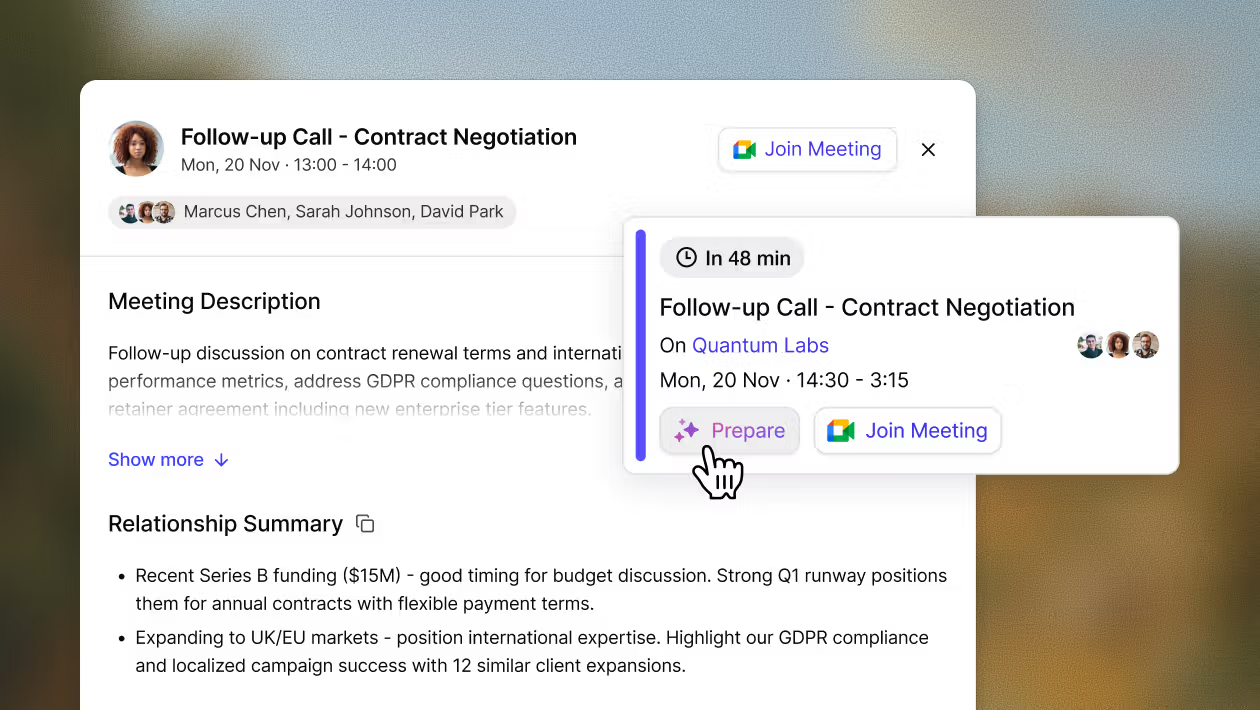
- AI Meeting Prep, which brings relevant information together before a call. This is currently listed as a beta feature.
Growth also includes workflow automation and more detailed reporting, so consider the value of the whole plan alongside its AI features.
Capsule offers monthly and annual billing, plus a 14-day trial of its paid plans. Use that time to try the features with everyday tasks and involve the colleagues who will use them. You’ll get a much clearer sense of their value than from a feature list alone.
Look beyond the starting price
The easiest mistake is to compare the headline prices and assume you’re comparing the same thing. A useful budget includes the subscription, the cost of accessing the AI tools you need and any charges linked to usage. It should also account for what happens when your team grows or has a busier month.
Your unfair advantage
Price is only part of the decision. A feature your team rarely uses adds little value, even if it’s included. A tool that consistently saves time on work you already do may justify a higher subscription. Start with your team’s needs, get a clear quote and test the features before committing. The aim is to choose a CRM that earns its place in your working day at a cost you understand.
Copyright
Rose McMillan · June 17, 2026
Stay Connected with ERBS
Read our latest updates
Enquire now
Get in touch