AI Meeting Prep for Capsule CRM: your briefing for every call

The 9:57am Problem
Your next call starts at ten. It’s now 9:57am and you’re searching your inbox for something that might jog your memory. You recognise the name and remember having a good conversation. What you actually agreed to do afterwards is proving less memorable.
Somewhere there’s an email explaining everything. It would be helpful if it introduced itself.
When you’re running a business, preparing for meetings has to compete with answering questions, chasing updates and dealing with whatever has just become urgent. The thirty minutes you set aside to catch up can quickly shrink to three.
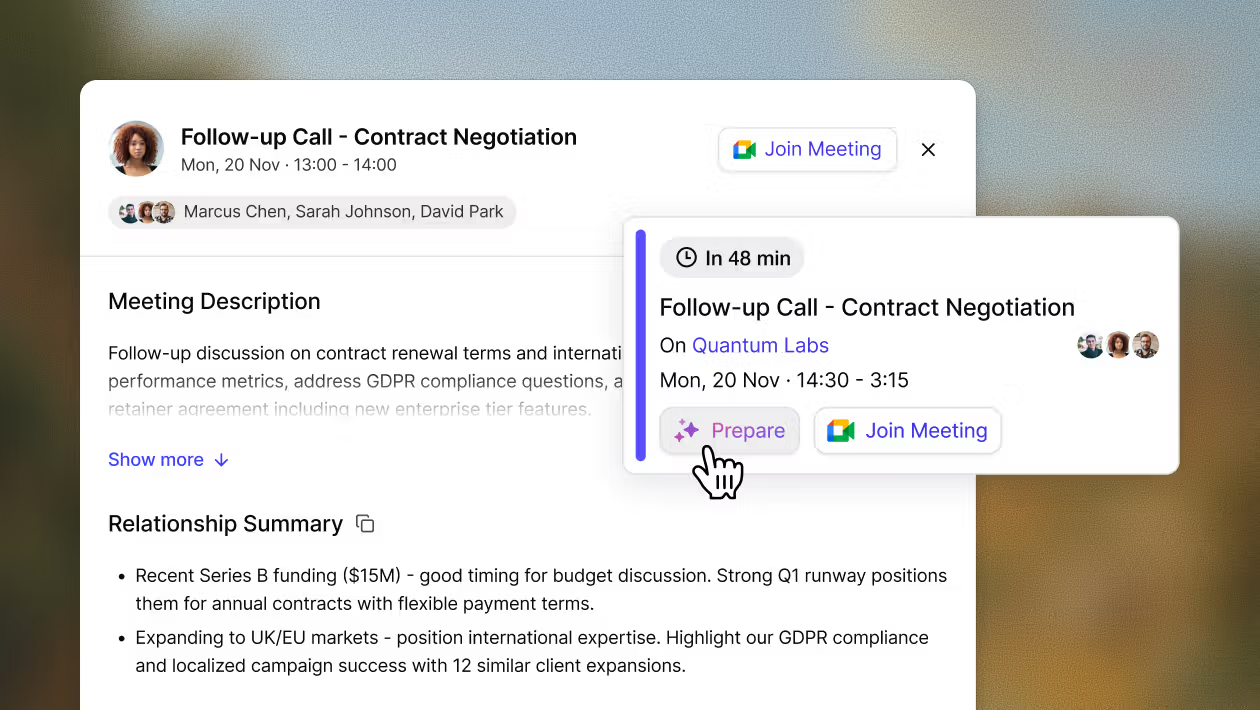
Capsule’s AI Meeting Prep helps you make that time count. It uses information already recorded in your CRM to put together a briefing on your contact before the call, so you can spend the opening minutes having a conversation instead of quietly piecing together the last one.
Who needs a briefing before every call?
If your day is full of meetings, unexpected problems and, somewhere in between, the work you actually planned to do, AI Meeting Prep is for you.
It’s designed for small and growing business owners, account managers and anyone whose role involves doing three people’s jobs with one person’s calendar.
Having a PA talk you through the day’s contacts would be lovely. For most small teams, you are the PA too.
AI Meeting Prep helps you go into calls feeling prepared, without spending an hour getting there. Whether you’re speaking to customers, suppliers or other external contacts, it brings the key information together so you can catch up quickly.
You can save the last minute panic for finding out why your microphone isn’t working.
What does AI Meeting Prep actually do?
A briefing before every call sounds useful, but what do you actually get?
- A quick relationship summary to remind you where things stand with your contact, without having to piece it together from emails and notes.
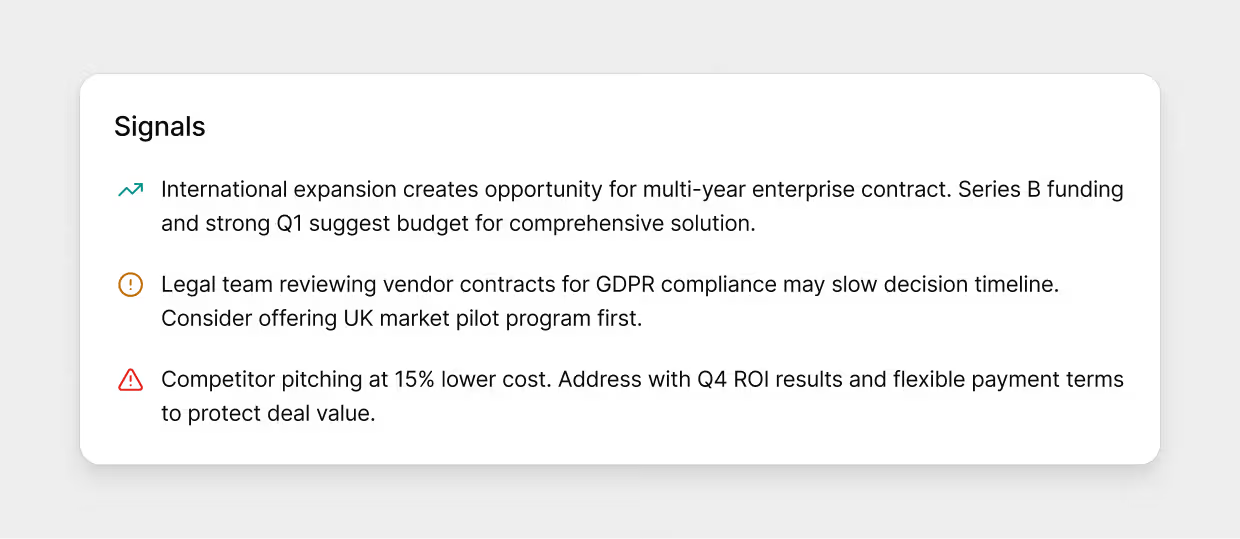
- Colour coded signals highlighting strengths, considerations and risks, so you can spot opportunities and anything that might need a careful approach.
- A better sense of control because knowing the background makes it easier to follow the conversation, especially when they open with “about that issue we raised last time”.
The briefing draws on what’s already recorded in Capsule CRM, including contact history, Opportunities, Projects and your team’s activity. It brings together what everyone has logged, so you can catch up on conversations you weren’t part of as well as the ones you’ve temporarily forgotten.
It also stays open during the meeting. If something comes up that you need to check, the information is there without you having to go looking for it.
Read through your day’s briefings over a coffee or catch up between back to back calls. Whatever your diary allows, you can get the context before the conversation starts.
How do I launch AI Meeting Prep?
Connect your Google Calendar or Outlook Calendar to Capsule and enable AI in your account settings. AI Meeting Prep then appears automatically on days when you have external calls scheduled.
Once that’s done, there’s nothing else to set up.
AI Meeting Prep vs AI Summaries. What’s the difference?
Fair question. Both use AI, both live in Capsule, and the names don’t exactly settle the matter. The difference comes down to when you use them and how much they cover.
AI Meeting Prep gets you ready for an upcoming conversation. Select a meeting in your calendar, and it brings together information linked to that contact, including Opportunities, Projects, activity and tasks. The briefing draws on what’s already recorded in Capsule to help you get up to speed before the call.
The AI Summaries tool helps inform you on particular past records. It summarises up to the last 50 logged activities and notes for a contact, organisation, Opportunity or Project. You can use it whenever you need to understand what’s been happening, whether there’s a meeting in the diary or not. The
Use Meeting Prep to get ready for a call, and AI Summaries to look back through a specific record.
Start every call with confidence
Three minutes until your next call, and you know where things stand. You’ve caught up on the last conversation, checked what’s outstanding and spotted anything worth bringing up.
Press ‘Start call’ with the quiet satisfaction of someone who’s done their homework. Without having to spend all morning doing it.
Olivia MacCunn
Copyright September 2026
Stay Connected with ERBS
Read our latest updates
Enquire now
Get in touch