Tracking Multiple Project Bids made easy with SageCRM

Have you ever found yourself juggling multiple quotes for a single, large project where your customers are all bidding against each other? For sub-tier suppliers, managing these complex sales scenarios can feel like a labyrinth. This article will show you how to gain clarity and control.
This requirement is quite common in project-based or contract-driven industries. Think of a government agency, construction suppliers / manufacturers, or a large enterprise inviting multiple vendors or subcontractors to bid. As a supplier, you might be asked by several of those bidders to provide pricing. This creates a many-to-one relationship between your quotes and a single ultimate project.
This is a common pattern where your company acts as a sub-tier supplier, and needs to:
- Quote to multiple potential prime bidders.
- Track all activity against the same external project or end customer.
- Ensure transparency, avoid conflicts, and consolidate visibility across sales engagements.
Why Solving This Problem is Crucial for Your Business.
In competitive, project-driven environments, clarity is king. Effectively managing multi-bid scenarios in Sage CRM isn't just about tidiness; it's about:
- Enhanced Visibility: Gaining a holistic view of your involvement in a single major project, even across different prime bidders.
- Strategic Decision-Making: Understanding your total exposure and potential revenue from a project, allowing for better resource allocation and forecasting.
- Conflict Prevention: Avoiding accidental overlaps or miscommunications when multiple internal teams might be engaging with different bidders on the same ultimate project.
- Improved Reporting: Generating accurate reports that reflect the true landscape of your sales pipeline and project involvement.
ERBS have created a Shared Projects module for managing all the above
A new entity called “Project” has been created within SageCRM and can be customised to capture the relevant project information as shown in the below example, Any relevant project related contacts, communications and documents can be linted to the project for reference.
Projects can be configured with a unique “Project Reference” or unique description or both to make them easily searchable.

Multiple opportunities for each supplier requesting a quote can be easily linked to the project and viewed.

Easily Duplicate Quotes
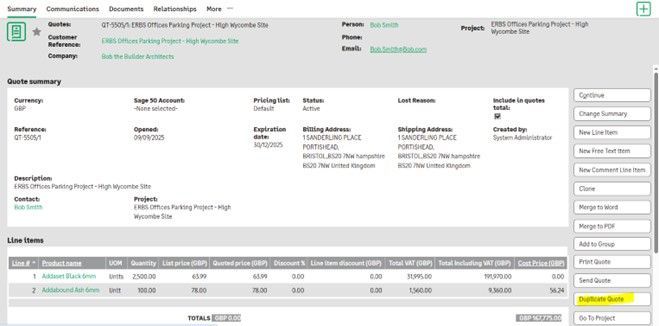
If an initial quote has been created from the first supplier request, you can then add in additional suppliers against the project and save time by selecting the “Duplicate Quote” feature within the original quote which will create a quote record against each of these suppliers with the same products and pricing. If the pricing needs to be adjusted for a supplier, the quote can easily be updated instead of recreated.
Lost Quote Auto Closure
We have also provided the facility to select either all or pick and choose which selected supplier quotes should be closed of automatically with a specific lost reason if one of the other suppliers wins the business. This cuts down on time having to separately close each of supplier quotes manually.

More information?
If you want to find out more about this module and how this can work for your business or ask any questions, get in touch with Nick Rainbird on +44 1494 490409 or nick@rainbirdbusiness-solutions.com
Stay Connected with ERBS
Read our latest updates
Enquire now
Get in touch